


Hippo Home: Maintain & Insure
4.677.00 Reviews
App Specs
- Version
- 6.1.0
- Updated On
- License
- Free
- Downloads
- 50,000+
- Developer
- Hippo Insurance Services
- Categories
- House & Home
- Platform
- Android
Screenshots

 Analysis by AppCompare
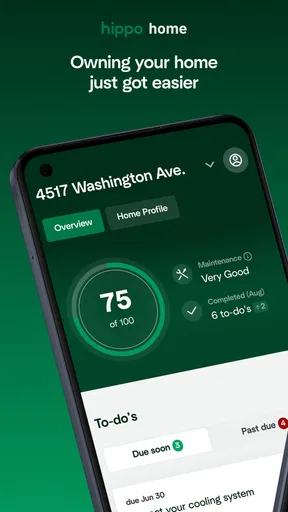
Managing a home usually means keeping several small responsibilities from becoming one large problem. Maintenance reminders, insurance details, household records, and questions about what needs attention can easily end up scattered across email, notes, paper folders, and conversations with other people in the household. Hippo Home: Maintain & Insure is designed to bring that homeownership work into one place, and after spending time with it, I found its strongest appeal is not flashy technology but a clearer way to stay aware of the home you already own.
It is a free House & Home app from Hippo Insurance Services, with an Everyone age rating. The store presents it as “Hippo Home,” while the fuller name makes its two-part purpose clearer: maintaining the property and handling the insurance side of homeownership. That combination makes it more focused than a general checklist app, although it also means the best experience is likely to come from someone who wants home care and coverage information considered together rather than separately.
How Hippo Home fits into a shared household
I can see this app being particularly useful in a home where responsibilities are shared but not always discussed at the right moment. Imagine one person notices a small issue in the kitchen, another handles insurance paperwork, and a third person is usually home when a repair professional arrives. Without a common reference point, each person may know one part of the story while nobody has the complete picture. A dedicated home app can reduce that confusion by giving the household a place to return to when deciding what needs attention.
The practical value is in creating a repeatable habit. Rather than waiting until a leak, storm, appliance failure, or renewal question forces everyone to search through old messages, I would use the app as part of a monthly home check-in. Open it, review what is pending, note anything that has changed, and make sure the person responsible for the next step knows about it. That routine is more useful than opening the app only during an emergency, when stress makes missing information harder to spot.
There is also a subtle benefit for people who are new to owning a home. A first-time homeowner may know how to pay bills but feel less confident about the less visible work of protecting and maintaining a property. The insurance and maintenance focus gives those responsibilities a clearer mental shape. It does not turn homeownership into a simple task, but it can help prevent the “I will remember that later” approach that causes minor jobs to disappear.
For a couple or a shared household, I would avoid treating the app as a replacement for conversation. It can support coordination, but it does not remove the need to agree on priorities, budgets, or who is actually handling a repair. A note that something needs attention is not the same as a confirmed appointment, a completed job, or an approved expense. That distinction matters, especially when several people use the same device or look at the same household information.
What I would do before inviting anyone else into the routine
I would begin by deciding what the app is for in our household. Is it mainly a place to keep maintenance visible, a way to stay closer to insurance information, or both? That decision prevents the app from becoming another general-purpose storage drawer. I would then agree on a simple rule: household items belong in the shared workflow, while personal account details and private conversations remain with the account holder.
Worth Reading Before You Choose

EA SPORTS FC Mobile 26 Is a Bigger Football Game, but It Takes Time

Flipboard Shows What News Apps Must Do Beyond the Feed

Switching to Android Auto Means Rethinking Your Driving Routine

Google Calendar Makes a Crowded Week Easier to Manage

Ludo King Makes the Most of the Minutes Between Plans

Baby Panda World Brings Quick Play to Modern Phones, but Its Game Library Feels Busy
This boundary is important because home administration often mixes ordinary tasks with sensitive information. A person may be comfortable showing that a maintenance issue exists without wanting every financial or insurance detail displayed on a shared phone. Hippo Home should therefore be introduced with the same care as any other account-based service: use individual judgment about who handles sign-in, do not leave private information visible on a device that everyone uses, and avoid assuming that access to household tasks automatically means access to every account detail.
I also recommend starting with a small, useful set of information instead of trying to document the entire property in one sitting. Begin with the areas that are easiest to forget or most expensive to neglect. Once the habit feels natural, expand the routine. This approach makes the app feel like a practical home companion rather than a demanding cataloging project.
One non-obvious advantage of this gradual setup is that it gives the household a chance to notice disagreements early. Perhaps one person considers a repair urgent while another sees it as cosmetic. Recording the issue and discussing its priority exposes that difference before it turns into resentment. The app becomes a prompt for a decision, not merely a place where unfinished work accumulates.
Account boundaries matter more than shared-device convenience
Household use can be convenient when one phone or tablet is always nearby, but convenience should not blur ownership. The person responsible for the insurance relationship should remain clear, and other household members should know whether they are reviewing information, contributing maintenance notes, or making decisions. I would not hand over a signed-in device casually, particularly if the device is used by guests, children, or people outside the household.
The Everyone content rating makes the app broadly suitable from an age-classification perspective, but that does not mean every account detail is appropriate for every age group. A younger household member might help identify a dripping tap or remind an adult about a task, while an adult should handle coverage decisions and sensitive records. That is a sensible division of responsibility even when everyone is technically able to open the app.
Trust also works both ways. If several adults contribute, each person should be able to explain what they changed and why. I would use a shared household conversation or a simple agreed naming style alongside the app so that an entry such as “check roof” has context: what prompted it, how urgent it is, and who will follow up. The app can organize the work, but the household still supplies the meaning.
Maintenance and insurance in one workflow
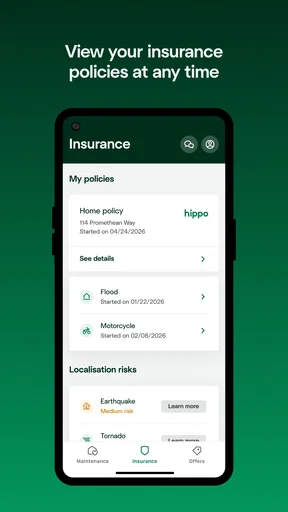
The central idea is useful because maintenance and insurance are connected in real life, even though people often manage them in separate places. A neglected maintenance issue can become a larger problem, while insurance information is most useful when the homeowner understands what the property contains and what has changed. Keeping these subjects close together encourages a more complete view of the home, rather than treating insurance as a document to find only after something goes wrong.
In my experience, the biggest improvement comes from using the app before there is a claim or urgent repair. After a home project, I would make a habit of reviewing what changed in the property and whether any related records need attention. After noticing a recurring problem, I would record the issue while the details are fresh instead of relying on memory. These small actions are easy to skip, but they create a more reliable history of the home’s condition.
A realistic example is a seasonal change in weather. Before the colder months, I might walk through the home and note signs of drafts, water intrusion, or equipment that is behaving differently. I would then discuss which items need immediate action and which can wait. If an issue later becomes more serious, having started the conversation earlier is valuable, even if the app itself does not solve the repair.
Another useful workflow is preparing for a conversation with a professional. Rather than calling with a vague description, I would first gather the relevant details in the app and check whether the problem has appeared before. That can make the conversation more efficient and reduce the chance of forgetting an important observation. It is a modest benefit, but it is exactly the kind of friction a home-management tool should remove.
There is a trade-off here. A combined maintenance-and-insurance app is more relevant to homeownership than a generic notes app, but it may feel less flexible if you want to manage unrelated household projects, shopping lists, renovation budgets, or detailed contractor records. For those jobs, a general task manager, spreadsheet, or dedicated property-record system may still be better. I would use Hippo Home for the home-protection layer, not force it to become the only tool in the household.
Where it is stronger than ordinary notes and reminders
A normal notes app is excellent for quickly typing “replace filter” or “call plumber,” but it leaves the homeowner responsible for designing the entire system. Hippo Home starts from a more specific understanding of homeownership. That focus can make it easier to think about maintenance and insurance as connected responsibilities instead of isolated reminders.
Generic calendar reminders are also limited in a different way. They are good at telling me that something is due, but they do not necessarily encourage me to connect the task with the condition of the property or the broader protection of the home. A calendar can remain useful for appointments and deadlines, while Hippo Home serves as the place where the home-related context lives.
Paper folders still have a role, especially for people who prefer physical documents or need to keep original paperwork. I would not discard those records simply because an app is available. The more sensible approach is to use the app as the accessible front door to household awareness and keep important originals stored safely elsewhere. That gives me convenience without pretending that one digital tool should carry every responsibility.
The strongest trade-off is focus versus breadth. Hippo Home feels more purposeful than a blank digital notebook for someone who wants guidance around maintaining and insuring a property. On the other hand, homeowners with complex rentals, multiple properties, extensive renovation work, or highly detailed asset inventories may need a more specialized system. The app is easier to approach when the goal is organized homeownership, not professional property administration.
Everyday coordination without overcomplicating the home
I would keep the household workflow deliberately simple. One person can review the home-related items at a regular interval, while other residents report changes as they notice them. A shared device can make quick observations convenient, but the household should agree on who checks the information and turns it into an action. Otherwise, everyone may assume someone else is responsible.
A helpful habit is to separate observation from commitment. “There is moisture under the sink” is an observation. “I will arrange a repair this week” is a commitment. Recording or discussing both prevents a common household failure: an issue is mentioned, everyone believes it has been handled, and the problem remains. This distinction is one of the most useful ways to get value from a home-management app without filling it with unnecessary detail.
I would also review old items rather than allowing them to become permanent background noise. If a task is complete, treat it as complete. If it is no longer relevant, remove it or otherwise stop treating it as active. A crowded home dashboard can be just as discouraging as a messy paper folder. The app works best when its current view reflects what the household genuinely needs to consider now.
For shared living arrangements, the question is not only whether people can coordinate but whether they should have the same level of access. Roommates may need to report a maintenance issue without needing to manage insurance information. A family member helping an older homeowner may need practical visibility while the account holder retains control of sensitive decisions. I would establish those expectations before making the app part of a shared routine.
Age, trust, and the right person to manage the account
The Everyone rating makes Hippo Home approachable for a broad audience, but home insurance is still an adult responsibility in most households. I would be comfortable asking a younger person to help with a visual inspection or remind the family about a task, yet I would keep coverage questions, account security, and formal decisions with the responsible adult.
This is also a useful app for relatives who help manage a parent’s home, but only when the arrangement is clear and consensual. A helper can contribute observations and assist with organization, while the homeowner remains aware of what is being recorded and who can see it. Trust should be established outside the screen rather than assumed because the app appears simple to use.
Shared-device use deserves particular attention. If the household tablet is left in a living room, I would check who can access it and whether private account information could be seen by visitors. I would also avoid allowing a child to experiment with an adult’s signed-in account simply because the app has an Everyone rating. Age suitability describes the content category; it does not replace sensible account boundaries.
That balance is one reason I would recommend the app more readily to an organized homeowner than to a household looking for automatic family management. Its value depends on people using it thoughtfully. It can support trust when everyone understands the arrangement, but it cannot create trust where responsibilities and permissions have never been discussed.
Version, availability, and what the numbers suggest
Hippo Home was released on February 28, 2022, and the current version is 6.1.0 with a minimum operating system requirement of 11. That makes checking device compatibility part of the installation decision, particularly if an older phone or shared tablet is involved. I would update the device first if necessary, then decide whether the household’s main device is suitable for regular access.
The app is free to install, which lowers the barrier to trying it as a household routine. Its store presence shows a 4.6 average from around 959 ratings and over 50 thousand installs, with 77 written reviews. Those figures suggest that many people find the concept worthwhile, but I would still judge it by how well it fits my own home responsibilities rather than treating popularity as proof that it will solve every organizational problem.
The developer is Hippo Insurance Services, so the insurance connection is central to the product’s identity. That is a strength for homeowners who already want maintenance and coverage considered together. It is also a reason to pause if you are looking for a completely provider-neutral property-management tool. The app makes the most sense when its insurance-oriented context matches what you want from a home app.
Who should use it, and who should choose something else
I would recommend Hippo Home to a homeowner who wants a focused starting point for keeping property care visible, especially if maintenance and insurance currently live in separate mental boxes. It is also a good fit for a household where one person handles paperwork and another notices practical issues around the home. The app can give those contributions a common place without requiring everyone to become a home-management expert.
It may be less suitable for someone who only wants a basic reminder list. A calendar or notes app may be faster for isolated tasks, and there is no reason to add a specialized home app if you rarely need to think about insurance or property upkeep. I would also look elsewhere if I needed advanced project management, detailed contractor accounting, or a system built for multiple properties.
Renters may find parts of the maintenance mindset helpful, but the insurance and homeownership focus is more naturally aimed at property owners. Likewise, a household that expects automatic coordination, elaborate family permissions, or a full replacement for communication should set its expectations lower. The app can organize attention; it cannot decide who should act, negotiate a repair, or interpret a policy on the household’s behalf.
My household verdict
After looking at the app through the lens of shared-device use and real household responsibilities, I see Hippo Home as a focused organizational aid rather than an all-purpose home operating system. Its best idea is bringing maintenance and insurance into the same conversation, because those subjects are easy to separate until a problem makes the connection urgent.
I would use it as a regular checkpoint: notice changes, clarify responsibility, review what is still active, and keep sensitive account access with the appropriate adult. I would pair it with ordinary communication, a calendar for fixed appointments, and secure storage for important original documents. That combination respects what the app does well without asking it to handle jobs it was not designed to replace.
My recommendation is simple: choose Hippo Home if you want a homeownership-focused place to stay organized, but make the household agreement around access and responsibility before making it a shared habit. For a homeowner who values that balance, the free price and focused purpose make it worth trying. For someone seeking a broad, provider-neutral property-management suite, a different tool may be the better long-term fit.
Pros
- Simple interface makes home maintenance tasks easy to organize.
- Helpful reminders can reduce the chance of missing routine upkeep.
- Insurance details are kept alongside property information for convenience.
- Useful for tracking several homes or rental properties in one place.
- Can make household responsibilities clearer for the whole family.
Cons
- Some features may require entering considerable property information first.
- Reminder options may feel limited for users with complex maintenance schedules.
- Insurance guidance may not replace advice from a qualified professional.
- The app’s usefulness depends on keeping records updated regularly.
- Availability of features may vary by region or insurance provider.
FAQs for Hippo Home: Maintain & Insure
What is Hippo Home: Maintain & Insure?
Hippo Home: Maintain & Insure is a home-management app designed to help homeowners organize maintenance tasks, keep important property information in one place, and manage insurance-related details. It can make it easier to track repairs, understand recommended upkeep, and stay prepared when something goes wrong at home. The exact features and availability may vary depending on your location and eligibility.
Can I use Hippo Home: Maintain & Insure if I am not a Hippo insurance customer?
Some parts of Hippo Home: Maintain & Insure may be available to homeowners who are not currently insured through Hippo, while other tools or insurance features may require an eligible Hippo policy. After installing the app, check the sign-up options and account requirements for your region. Availability can also depend on the insurance products Hippo offers in your state or country.
What information do I need to create an account?
You will generally need to provide basic personal and property information, along with an email address or another supported sign-in method. If you use the insurance functions, the app may request policy details or information needed to connect your account with an existing Hippo policy. Only enter accurate information, and review the privacy policy before submitting sensitive household or insurance data.
Does the app help me schedule and remember home maintenance?
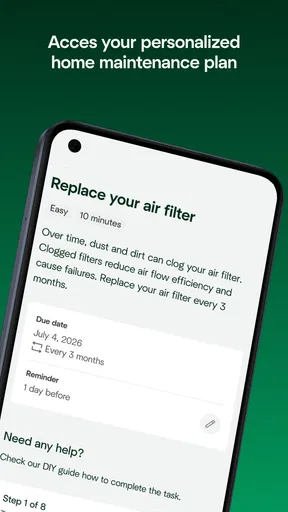
A key purpose of Hippo Home: Maintain & Insure is helping homeowners stay on top of routine property care. Depending on the current version, it may provide maintenance recommendations, reminders, checklists, or ways to record completed work. It should be viewed as an organizational aid rather than a replacement for qualified contractors, inspections, emergency services, or professional advice.
Is Hippo Home: Maintain & Insure free to download, and does it replace my insurance policy?
The app may be free to download, but downloading it does not automatically provide home insurance coverage or replace an existing policy. Insurance pricing, eligibility, deductibles, exclusions, and coverage limits are determined separately through Hippo’s insurance process and policy documents. Before relying on any information in the app, review your official policy and contact Hippo or your agent with coverage questions.


